
PACKERS AND MOVERS SERVICE





Marshall House Shifting Service – Your Trusted Moving Partner in Islamabad & Rawalpindi 🇵🇰
Planning to move your home? Let Marshall Packers and Movers handle your house shifting with ease and care! We offer professional, safe, and affordable house relocation services in Islamabad, Rawalpindi, and surrounding areas. From packing and loading to transport and unpacking – we do it all.
✅ Reliable & Trained Staff
✅ Secure Packing Materials
✅ Local & Long-Distance Moves
✅ Timely & Hassle-Free Shifting
✅ Free Survey & Quotation
📦 Whether it's a full house move or a few items, trust Marshall for smooth relocation!
📞 Call Now: [051-2353617]
🔖 Tags:
#HouseShiftingIslamabad #PackersAndMoversRawalpindi #MarshallHouseShifting #HomeRelocationPakistan #MovingServicesIslamabad #ProfessionalMoversPK #ShiftingServiceRawalpindi #TrustedMoversPakistan #MarshallPackers #RelocationExpertsIslamabad #HousePackingServices #BestMovingCompanyPakistan
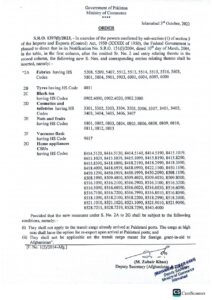
Used vehicles
Used auto parts
Used electronics and appliances (TVs, fridges, washing machines, etc.)
Used tyres and tubes
Perfumes and cosmetics (high-end brands)
Branded garments and shoes
Designer handbags and accessories
Jewelry and precious stones
Cigarettes and tobacco products
Sugar (in some years, due to local shortages)
Fertilizers
Black tea
Cooking oil and ghee
Mobile phones (especially high-end)
Laptops and tablets
Communication equipment
Industrial chemicals (requiring NOC or control)
Precursors that may be used in explosives or narcotics
The restrictions are enforced through:
SROs (Statutory Regulatory Orders) issued by FBR and Pakistan Customs
Notifications under the Afghanistan–Pakistan Transit Trade Agreement (APTTA)
These laws are reviewed and updated periodically to address smuggling, revenue leakage, and economic concerns.


Work with the client to understand the scope of the move (size of home, distance) and provide an accurate estimate.
Create a detailed list of the client’s belongings, categorizing them by room and fragility.
Gather packing supplies: Ensure you have enough boxes (various sizes), packing paper, bubble wrap, packing peanuts, furniture pads, tape, and markers.
Packing Day:
Discuss the plan with the client, addressing any concerns and answering questions.
Carefully disassemble large furniture items to ensure safe transport and reassembly at the new location.
Use proper packing techniques for different items:
Dishes: Wrap individually with paper and pack upright in cushioned boxes.
Clothes: Pack in wardrobe boxes or suitcases for hanging items, folded clothes go in regular boxes.
Electronics: Wrap electronics in bubble wrap and pack in their original boxes if possible.
Fragile items: Use plenty of cushioning for valuables and fragile items.
Labeling: Clearly label every box with the destination room and a brief description of the contents.
Load the truck strategically, placing heavier boxes on the bottom and lighter ones on top. Use furniture pads and tie-down straps to secure furniture in the truck.
Inventory check: Double-check the inventory list to ensure everything is loaded onto the truck.
Transport and unload: Carefully transport the client’s belongings to the new location and unload the truck, placing boxes in designated rooms.
Stay organized: Maintain a system throughout the process to avoid confusion and lost items.
Be efficient: Work quickly but carefully to ensure a smooth and timely move.
Excellent customer service: Be polite, professional, and address the client’s needs throughout the move.
By following these steps and best practices, you can ensure a successful and stress-free moving experience for our Valuable clients 0304-111-1221


Activating Microsoft Office 2013 is essential to unlock all the features and enjoy the full benefits of this popular software suite. The office 2013 activator is a tool designed to help users activate their Office 2013 product quickly and easily. This activator works by bypassing the usual activation process, allowing users to use Office 2013 without purchasing a license key.
Using an office 2013 activator can save time and effort, especially for those who want to avoid the complicated steps involved in manual activation. It supports various versions of Office 2013, making it a versatile choice for many users. The activator ensures that all Office apps, such as Word, Excel, and PowerPoint, are fully functional after activation.
It is important to understand that the office 2013 activator tool works by modifying system files to register the software as genuine. This process helps users avoid activation errors and enjoy uninterrupted access to Office features. However, users should be cautious and ensure they download the activator from a trusted source to avoid security risks.
The office 2013 activator is a handy tool that helps users complete the Office 2013 activation quickly. It works as activation software designed to simplify the activation process, so you don’t have to worry about entering long product keys or dealing with complicated software registration steps. This tool ensures your Office 2013 license is recognized by the system, unlocking all features without delays.
Using this activation software means you can avoid common activation errors and enjoy full access to Microsoft Office apps like Word, Excel, and PowerPoint. The activator modifies necessary files to register your software as genuine, making the activation process smooth and fast.
The office 2013 activator is a special program that helps activate Office 2013 without needing to buy a new license. It works by running a series of commands that complete the software registration automatically. This activation software changes some system settings so that Office 2013 thinks it has a valid license.
Here’s a simple explanation of how it works:
This tool is useful because it saves time and avoids the hassle of manual activation steps.
Before using the office 2013 activator, make sure your computer meets these system requirements:
| Requirement | Details |
|---|---|
| Operating System | Windows 7, 8, 8.1, 10 |
| Office Version | Microsoft Office 2013 (all editions) |
| RAM | Minimum 2 GB |
| Disk Space | At least 500 MB free |
| Administrator Rights | Required for activation process |
Having these requirements ensures the activation software runs smoothly and completes the Office 2013 activation without issues.
Using the command prompt (CMD) with the office 2013 activator is a common way to activate Office 2013. Follow these steps for a successful activation process:
This method is straightforward and helps users activate their Office 2013 license quickly.
To activate Office 2013 permanently, the activation software must complete the software registration without time limits. Here’s how to do it:
Using activation software is the easiest way to ensure your Office 2013 license stays valid and your software remains fully functional.
Note: Always use trusted activation software to avoid security risks and ensure a smooth activation process.
When activating Office 2013, users may face some common problems. Understanding these issues and knowing how to fix them can save time and frustration. Compatibility with your computer’s operating system is also important to ensure smooth activation. Below, you will find helpful information about Office 2013 activation issues, troubleshooting methods, and useful activation tips.
Office 2013 activation help is available through several simple steps. Sometimes, activation errors happen because the software is not compatible with the current system or because of network problems. Checking system requirements and following proper activation steps can prevent many issues.
| Problem Type | Possible Cause | Suggested Solution |
|---|---|---|
| Activation error message | Incorrect product key or expired | Verify key and re-enter |
| Software not genuine warning | System date/time incorrect | Correct date/time settings |
| Activation fails repeatedly | Network or firewall blocking | Disable firewall temporarily |
| Compatibility issues | Unsupported OS version | Upgrade OS or use compatible version |
The MS Office 2013 activator works well on Windows 7 and other versions like Windows 8 and 10. Compatibility is key to successful activation. Before using the activator, make sure your Windows version supports Office 2013. Older or unsupported systems may cause activation problems.
Using the activator on a compatible system helps avoid common errors and speeds up the activation process. It modifies system files to register Office 2013 as genuine, allowing full use of all features. Always check for compatibility to ensure smooth activation and avoid unnecessary troubleshooting.
Many users face activation problems such as error codes or failure messages. These issues often result from network problems, incorrect license keys, or system incompatibility. Troubleshooting these problems involves checking your internet connection, verifying the product key, and ensuring your system meets Office 2013 requirements.
If activation fails, try these steps:
These activation tips can help resolve most common problems and get your Office software working properly.
To avoid Office 2013 activation issues, follow these best practices:
Tip: If you encounter problems, use official troubleshooting guides or seek Office 2013 activation help to avoid damaging your software or system.
Following these activation tips will help keep your Office 2013 software running smoothly and fully functional.
Q: Can I use the Office 2013 activator on any Windows version?
A: The activator works best on Windows 7, 8, and 10. Older versions may not be compatible.
Q: What should I do if activation fails repeatedly?
A: Check your internet connection, disable firewall temporarily, and run the activator as administrator.
Q: Is it safe to use Office 2013 activator tools?
A: Only use trusted activators to avoid security risks and ensure proper activation.
Q: How do I know if my Office 2013 is activated?
A: Open any Office app and check the activation status in the account settings.
Q: Can I reactivate Office 2013 if I reinstall Windows?
A: Yes, but you may need to use the activator or enter your product key again.
These FAQs cover common concerns and provide quick answers for users needing Office 2013 activation help.